Best CRM Software for Small Business in India: Complete 2026 Guide
Running a small business often means managing sales, customers, follow-ups, quotations, and daily operations at the same time. In the early stages, a spreadsheet and a phone may…
Running a small business often means managing sales, customers, follow-ups, quotations, and daily operations at the same time. In the early stages, a spreadsheet and a phone may be enough to keep everything under control. But as enquiries increase and more people join the sales team, managing customer information manually can become difficult.
A lead may come through a website, Google Ads, social media, email, a phone call, or a referral. If every enquiry is stored in a different place, it becomes easy to lose track of conversations and follow-ups. This is where CRM software can make a practical difference.
A CRM Software gives businesses a central place to organize leads, customer information, sales opportunities, activities, and follow-ups. For small businesses in India, the right system should not simply have a long list of features. It should be easy to use, reasonably priced, and suitable for the way the business actually sells.
Why Small Businesses Are Moving to CRM Software
Many small businesses start with Excel or Google Sheets because they are familiar and inexpensive. There is nothing wrong with this approach when the sales process is small. The problem appears when the number of enquiries grows.
Imagine a team receiving 50 or 100 enquiries every month. Salespeople need to contact prospects, arrange meetings, send quotations, answer questions, and follow up at different times. Managing all of this through spreadsheets and personal reminders can quickly become confusing. A CRM can bring these activities together.
Instead of asking a salesperson for an update on every lead, a manager can view the sales pipeline and see which opportunities are new, active, pending, won, or lost.
What Should You Look for in a CRM?
The right CRM depends on the business, but several features are particularly useful for a small sales team.
Lead Management
A CRM should make it simple to add and organize new enquiries. Salespeople should be able to see basic customer information, lead source, current status, and the next action without searching through multiple files. Good lead management is not about collecting as much information as possible. It is about keeping the information that helps the team move the opportunity forward.
Sales Pipeline
A visual sales pipeline helps a team understand where opportunities currently stand. For example, a business might use stages such as: New Lead → Contacted → Qualified → Proposal → Negotiation → Won/Lost The stages should reflect the company's actual sales process. A CRM that allows businesses to customize these stages can be more practical than one that forces every company into the same workflow.
Follow-Up Tracking
Many sales opportunities are lost simply because the next conversation never happens. A prospect might ask for a quotation today and request a follow-up after a few days. Without a proper reminder, that conversation can easily disappear among newer enquiries. A CRM allows salespeople to record the next activity and keep track of pending follow-ups. This is especially useful for small teams where every salesperson may be handling several opportunities at the same time.
Customer and Company Records
Customer information becomes more useful when previous interactions are available in the same place. A salesperson should be able to understand who the customer is, what was discussed earlier, which opportunities are open, and what action is scheduled next. This becomes even more important in B2B sales, where several people from the same company may be involved in the buying process.
CRM vs Excel: When Should You Make the Change?
Excel is a useful tool, and many businesses can continue using it for basic customer records. However, spreadsheets are not specifically designed to manage ongoing sales relationships. If your team is regularly dealing with duplicate records, missed follow-ups, unclear lead ownership, or difficulty preparing sales reports, it may be time to consider a CRM. The decision does not have to be based on company size.
A business with five salespeople and a large number of enquiries may benefit from CRM software earlier than a company with 20 employees and a very simple sales process. The better question is: Is your current method making sales management easier or creating more work?
What Makes a CRM Suitable for an Indian Small Business?
Budget is naturally important, but price should not be the only consideration. Before choosing a platform, consider how many people will use it, whether your existing data can be imported, what reports you need, and whether the sales team can learn the system without extensive training.
For Indian small businesses, it can also be useful to consider the type of customers you deal with and the channels through which enquiries arrive. A trading company may need a different workflow from a real estate business, agency, distributor, or software company. The CRM should support your process rather than forcing you to completely change it.
How Fidus360 CRM Helps Organize Sales
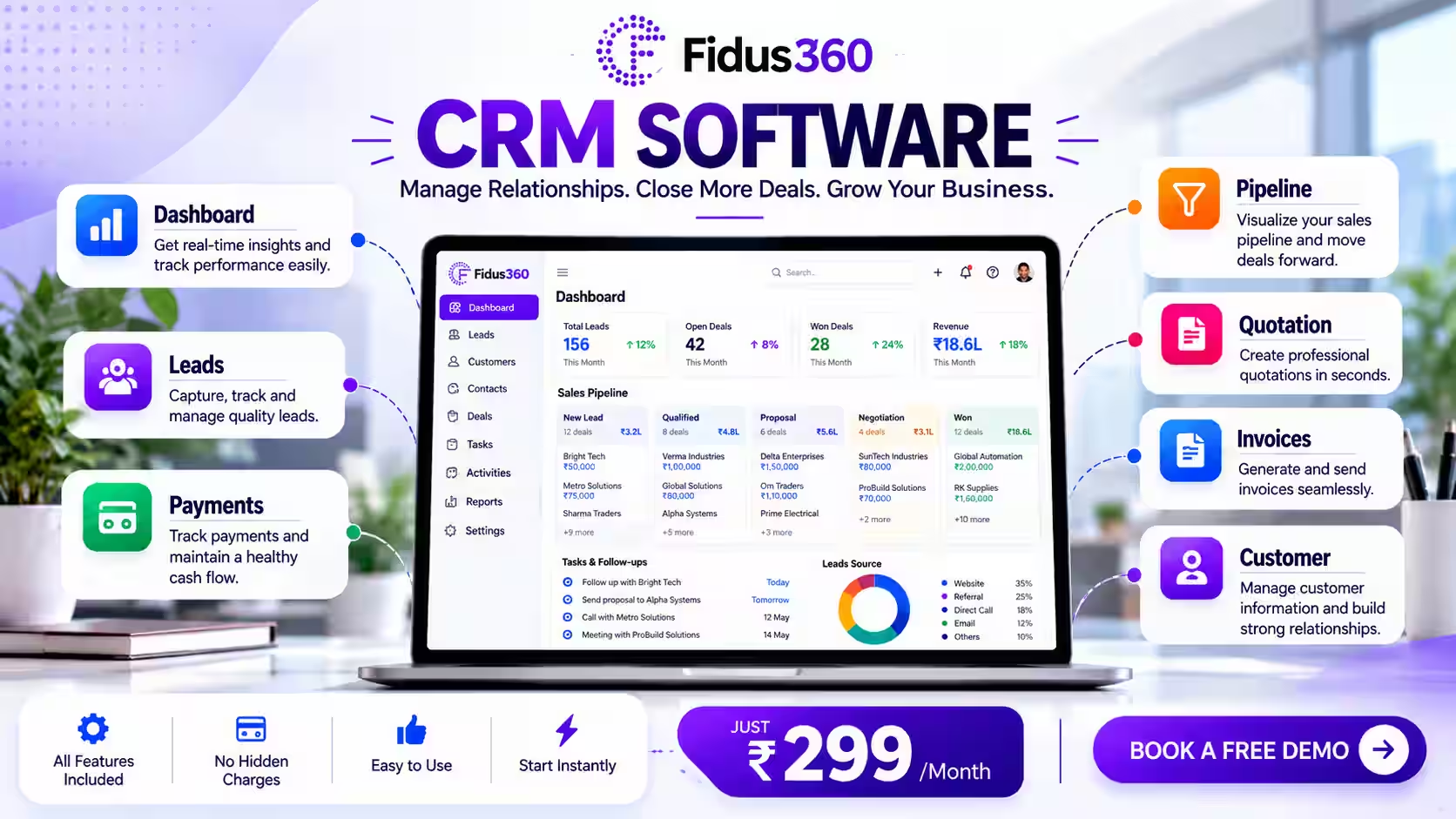
Fidus360 CRM is designed to bring common sales activities into one workspace. The platform provides tools for managing leads, contacts, companies, deals, sales stages, activities, and follow-ups. Its visual pipeline allows sales teams to see opportunities according to their current stage.
Businesses can also configure pipeline stages to match their own sales process. Another useful part of CRM management is activity tracking. Salespeople can record calls, meetings, emails, demos, and other activities so that important customer interactions do not remain only in personal notes or memory.
Fidus360 also provides sales analytics covering areas such as funnel conversion, win rate, sales-cycle information, lead sources, and lost reasons. For businesses moving away from spreadsheet-based sales management, these functions can provide a more structured way to manage daily sales work.
Affordable CRM Software: Look at the Overall Value
A low monthly price may look attractive, but businesses should consider what they actually receive for that price. Check whether the plan includes the features your team needs. Look at user limits, reporting, data import, integrations, support, and the ability to add users later.
Fidus360 currently lists CRM plans starting from ₹299 per user per month. Pricing and plan details can change, so businesses should check the current product page before making a purchase decision. For a small team, starting with the number of users who actually need access can help keep initial software costs manageable.
How CRM Can Help a Small Sales Team
A small team does not have unlimited time. One salesperson may be responsible for new enquiries, another for existing accounts, while a manager monitors the overall pipeline. A shared CRM gives everyone access to the information they need.
Instead of maintaining separate customer lists, the team can work from a common system. Managers can see the status of opportunities, while salespeople can focus on their assigned customers and upcoming activities.
This can also make employee handovers easier. If someone is unavailable, another team member can review the customer record and understand the previous interaction before contacting the prospect.
Questions to Ask Before Choosing CRM Software
- Before signing up for any CRM, consider these questions:
- How many leads do we receive each month?
- Where do our enquiries come from?
- How are follow-ups currently managed?
- How many employees need access?
- What stages does our sales process have?
- Can we import our existing customer data?
- What reports does management actually need?
- Can the pipeline be customized?
- Is the software easy enough for the sales team to use every day?
- Can the system grow with the business?
These questions can help you focus on practical requirements instead of choosing software based only on a long feature list.
Final Thoughts
The best CRM software for a small business is the one that fits its actual working process. You do not need hundreds of features if your main problems are missed follow-ups, scattered customer information, and poor visibility into sales opportunities.
Start by understanding where your current process breaks down. Then look for software that solves those specific problems. For businesses that want a centralized system for leads, customer information, sales opportunities, activities, follow-ups, and reporting, Fidus360 CRM offers a structured approach to managing the sales process.
As a business grows, having a clear view of every opportunity can become just as important as generating new leads. A well-organized CRM helps create that visibility while giving salespeople a practical place to manage the relationships that drive the business forward.
Frequently Asked Questions
1. What is CRM software for a small business?
CRM software helps small businesses organize leads, customer information, sales opportunities, follow-ups, and customer interactions in one place. It can replace scattered spreadsheets and manual reminders with a more structured sales process.
2. Does a small business really need CRM software?
Not every small business needs a CRM from day one. It becomes more useful when the number of leads increases, several people manage sales, follow-ups are being missed, or it becomes difficult to understand the current sales pipeline.
3. Is CRM better than Excel for managing leads?
Excel can work well for basic customer records, but CRM software is built specifically for managing sales activities, opportunities, follow-ups, and customer relationships. A CRM becomes particularly useful when a team needs shared, up-to-date sales information.
4. What features should I look for in a small business CRM?
Important features include lead management, contact management, sales pipeline tracking, follow-up reminders, activity history, reporting, data import, and customizable sales stages. The most important features depend on your business process.
5. How much does CRM software cost in India?
CRM pricing varies depending on the provider, features, and number of users. Fidus360 currently lists its CRM starting at ₹299 per user per month. Businesses should check the latest pricing and plan details before subscribing.
6. Can I move my Excel customer data to a CRM?
Yes. Many CRM platforms support CSV or spreadsheet imports. Fidus360 supports CSV import, making it possible to move existing customer information into the system rather than entering every record manually.
7. Can CRM software help improve sales follow-ups?
Yes. A CRM can help salespeople record previous interactions, schedule the next activity, and identify pending or overdue follow-ups. This makes it easier to maintain consistent communication with potential customers.
Related apps